MM-RYTM
Drum machine · MM-STUDIO by Maudite Machine
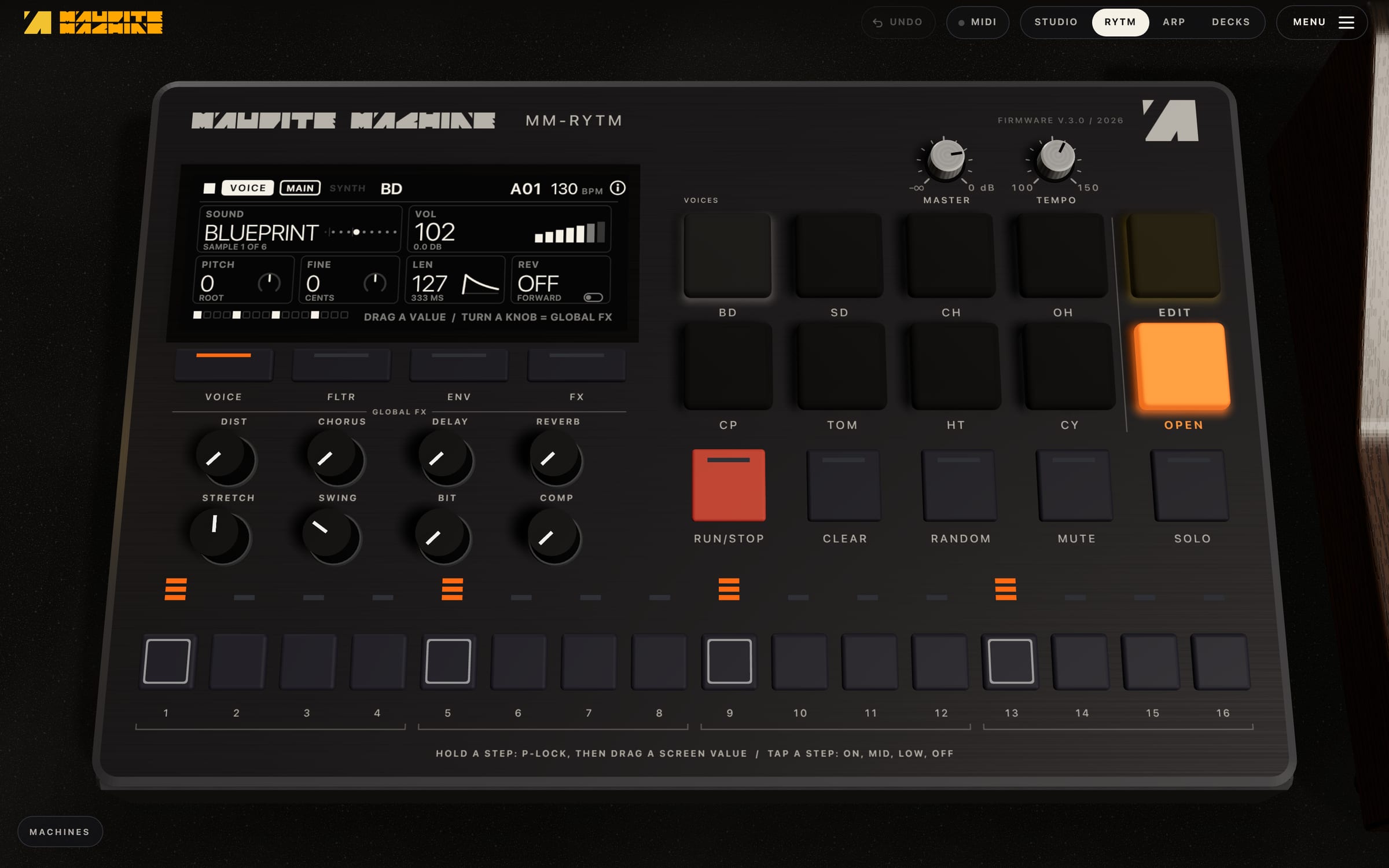
MM-RYTM is the drum machine of MM-STUDIO by Maudite Machine, a free 3D studio that you play in the browser, with no account and nothing to install. It has eight voices on 16 steps, with parameter locks.
Voices and sounds
The eight voices are BD, SD, CH, OH, CP, TOM, HT and CY. Each voice plays a SYNTH layer (909, 808 or MM models), a SAMPLE layer or both; the kick and snare samples were picked by Mika.
Steps and parameter locks
Tap a step to write a hit, tap again for MID, LOW and off, or hold and drag to set its velocity. Hold a step until the screen reads P-LOCK, then drag a screen value: it plays on this step only, for sound, volume, pitch, filter, envelope or voice effects.
Pages, effects and patterns
The screen has eight blocks, with values from 0 to 127, over four pages: VOICE, FLTR, ENV and FX. Each voice has its own DIST, CHORUS, DELAY and REVERB; the machine adds DIST, CHORUS, DELAY, REVERB, STRETCH, SWING, BIT and COMP, on the eight knobs under the screen on a computer. EDIT turns the steps into 16 patterns, A01 to A16, that you can chain. The tempo runs from 100 to 150 BPM.
How to play
- Open MM-RYTM. On a phone it opens first.
- Pick a voice pad, or press A S D F and Z X C V.
- Tap the steps to write its part, then press RUN/STOP or the space bar.
- Hold a step to lock a value, then SAVE the preset.
MIDI, browser and accessibility
Every knob, page, step and pad can be assigned with MIDI LEARN. The MIDI panel also has ready-made Roto-Control setups to import in ROTO-SETUP, with no MIDI LEARN needed. With its RSEQ setup imported, a Roto-Control doubles as a step sequencer: the steps scroll on its buttons, and holding one while turning a knob sets a lock.
MM-RYTM needs WebGL 2 and the Web Audio API. Every pad, step and knob has a named HTML twin for the keyboard and screen readers, and UNDO covers every change.
Questions
Is MM-RYTM free?
Yes. MM-RYTM is free, with no account, no download and no plug-in: it runs in your browser, on a computer or a phone.
Can I share my beat?
Yes. Press SHARE in the header of MM-STUDIO: on a phone the share sheet opens, on a computer the link is copied. Whoever opens the link gets your beat on MM-RYTM, with its steps, velocities, tempo, sounds and effects. Parameter locks and the samples you loaded from your own files stay in your browser.
Does it work on an iPhone or an Android phone?
Yes. On a phone MM-RYTM has its own portrait layout, with the pads, the steps and the screen at finger size. MIDI controllers need Chrome, Edge, Opera or Firefox on a computer: Safari and iOS have no Web MIDI.
Can I use my own samples?
Yes. Drop a WAV file on the sound list of the screen, or pick a file: the sample joins the list of its voice. It stays in this browser and is never uploaded.
Where are my patterns saved?
In your browser. The pattern you are working on is kept between visits, SAVE keeps up to 99 presets per machine, and UNDO in the header steps back through your changes. Clearing the browser data erases them, so share a link to keep a copy.
Can I export a WAV or a MIDI file?
MM-RYTM does not export audio itself. On a computer, the sampler of each MM-DECKS deck can record the MIXER, where MM-RYTM plays, and save the loop as a WAV file. Each drum pattern page has a MIDI file of its style.
Who made it
Mika designed and built MM-RYTM and the rest of MM-STUDIO. As Maudite Machine, he is a DJ and producer based in Montpellier and the founder of VRSTL Records.
- MM-STUDIO overview
- MM-ARP synth
- MM-DECKS DJ decks
- Press assets
- Contact
- Drum patterns for 10 styles, with MIDI files
- Listen to Maudite Machine's tracks